For desktop Chrome
Block YouTube Shorts in Chrome.
ShortsBlocker hides supported Shorts distractions while keeping regular videos, search and subscriptions available.
Free for individual users. Schools need an annual organisation licence. School licensing
What ShortsBlocker hides
Fewer Shorts distractions across the YouTube pages you already use.
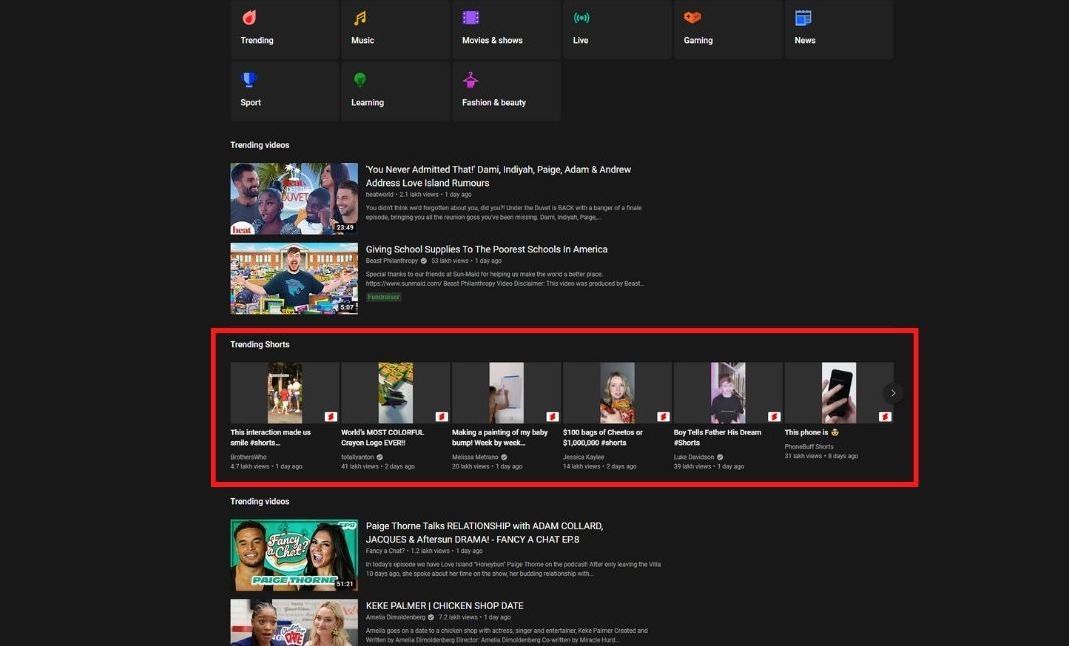
- Homepage Shorts shelves
- Shorts tab and navigation
- Shorts in search results
- Explore and subscriptions
ShortsBlocker for schools
Hide supported YouTube Shorts placements while keeping regular videos available. Schools need an organisation licence to use ShortsBlocker.
Designed for the YouTube website in desktop Chrome. YouTube mobile and TV apps are not supported.
Annual organisation licence
- Coverage
- 100 seats
- Billing
- Annually
Opens the SageSight Ltd. checkout on Stripe.
Ask a licensing questionDesktop Chrome
Designed for the YouTube website in desktop Chrome.
Regular videos stay
Search, subscriptions, and normal watch pages remain available.
Mobile apps
Chrome extensions cannot modify YouTube mobile or TV apps.
Get started in three steps
Install the extension, refresh YouTube, and browse as usual.
- 1
Add ShortsBlocker to Chrome
Install the extension from the Chrome Web Store and keep it enabled for YouTube.
- 2
Reload YouTube tabs
Refresh tabs that were already open so the extension can inspect the current page.
- 3
Browse normally
Supported Shorts placements are hidden while regular videos remain available.
If Shorts reappear
YouTube changes its layout often. Reload any open YouTube tabs, then check the latest release notes. If a placement still appears, tell us which page it is on.
Best first step
After installing or updating ShortsBlocker, reload each open YouTube tab so the latest rules can run.
ShortsBlocker FAQ
What does ShortsBlocker remove?
ShortsBlocker hides YouTube Shorts placements from supported Chrome pages, including the homepage, Shorts navigation, search, explore, and subscriptions.
Does ShortsBlocker delete my YouTube history or data?
No. ShortsBlocker cleans up visible YouTube pages in your browser. It does not delete your YouTube account data.
Why do Shorts sometimes reappear?
YouTube changes its page layout frequently. If Shorts reappear, update the extension, reload open YouTube tabs, and report the page where the placement still appears.
Is ShortsBlocker free?
ShortsBlocker is free to install. Schools need an annual organisation licence for use at school. Donations are optional for individual users.
Can schools use ShortsBlocker?
Yes. Schools need an annual organisation licence, which covers 100 seats. Use the Get annual licence link on this page to open the Stripe checkout. The extension is designed for the YouTube website in desktop Chrome.
Does a school licence block Shorts in the YouTube mobile app?
No. The organisation licence covers school use of the Chrome extension. Chrome extensions cannot modify YouTube mobile or TV apps.
Does ShortsBlocker work on desktop YouTube?
Yes. It is designed for the YouTube website in desktop Chrome. Chrome extensions cannot change the YouTube mobile or TV apps.
Can I use ShortsBlocker as a YouTube focus mode?
Yes. It reduces supported Shorts prompts while keeping regular YouTube videos, search, subscriptions, and watch pages available.
Keep the videos. Hide the Shorts.
Free for individual users on desktop Chrome.